
Telecom · bulk order validation
Validation Transparency — Bharti Airtel & Reliance Jio
01 — Overview
Ericsson's bulk order management workflow for Bharti Airtel and Reliance Jio lacked a clear separation between master data and transactional processes, resulting in validation errors, limited visibility, repetitive manual effort, and an increased risk of processing inaccuracies.
Key Impact
35%
Estimated Reduction
Validation time reduced through structured validation stages.
100%
Stage Visibility
Every validation stage exposed with status, progress, and actionable feedback.
Enterprise Standardization
Unified complex workflows using SAP Fiori components and patterns.
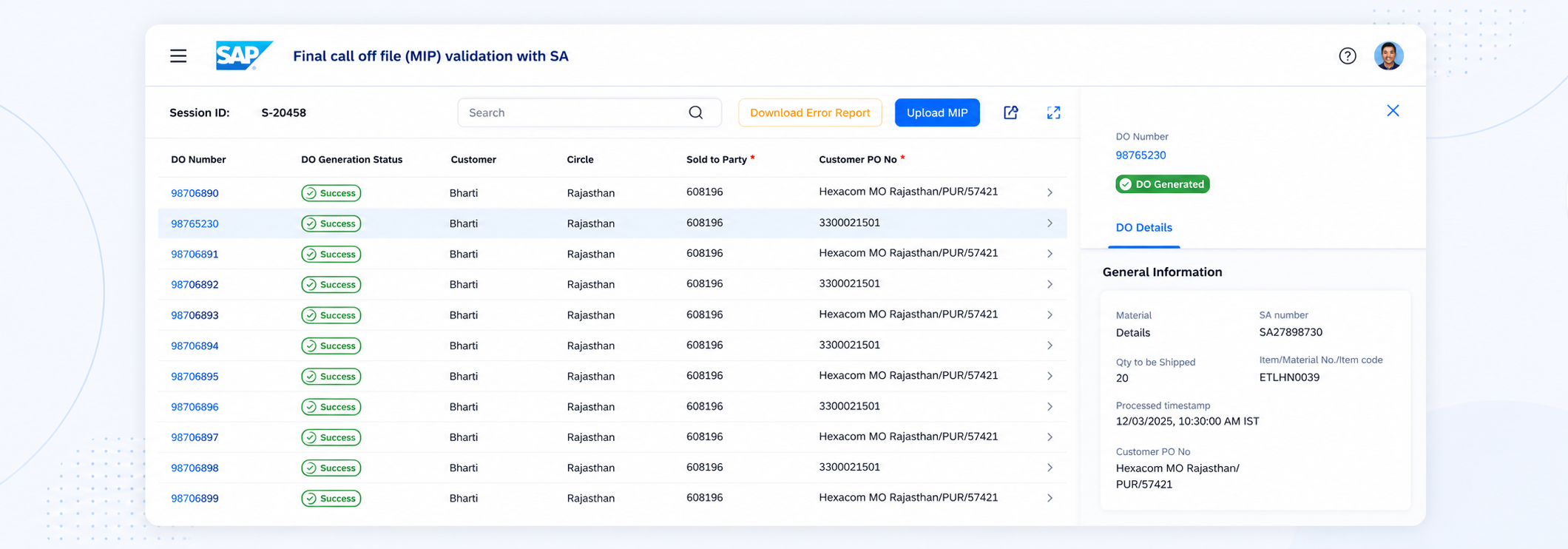
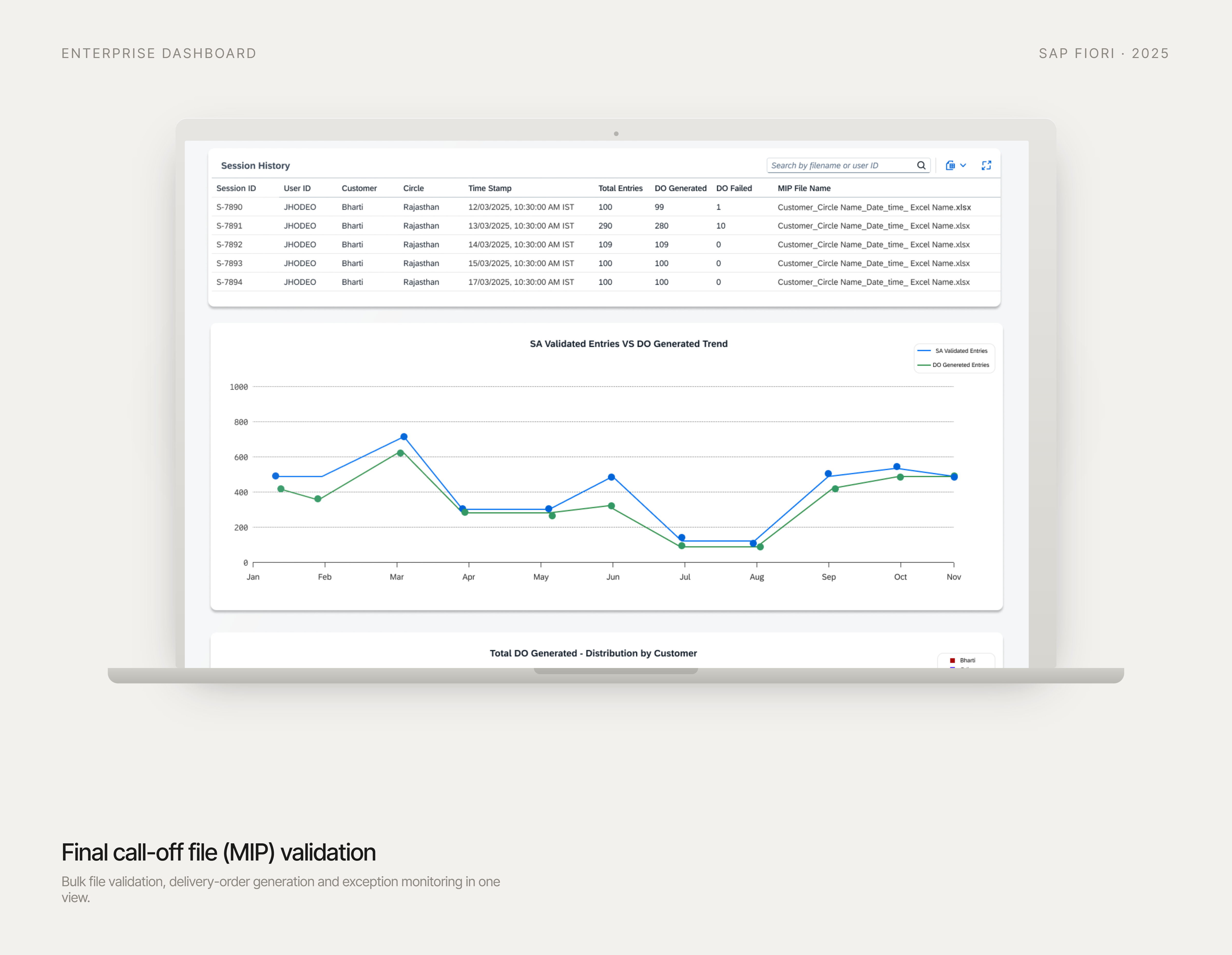
The redesigned validation screen: each order reporting its own status, not one verdict at the end.
02 — My Role
End-to-End UX Ownership
Owned the end-to-end UX design of the bulk order processing experience.
Conducted user interviews to uncover workflows, pain points, and edge cases, translating insights into scalable interaction models.
Validated concepts through iterative feedback with users, product stakeholders, SMEs, and engineers to ensure usability and technical feasibility.
Delivered implementation-ready designs using the SAP Design System.
03 — Goal
Understand Ericsson's complex order management architecture and identify where the MIP validation workflow fit within the broader order lifecycle.
The challenge was to simplify a technically complex process while aligning user needs, business rules, and system constraints across multiple integrated platforms.
What the SEM expected
Proposed experience
04 — Understanding the System
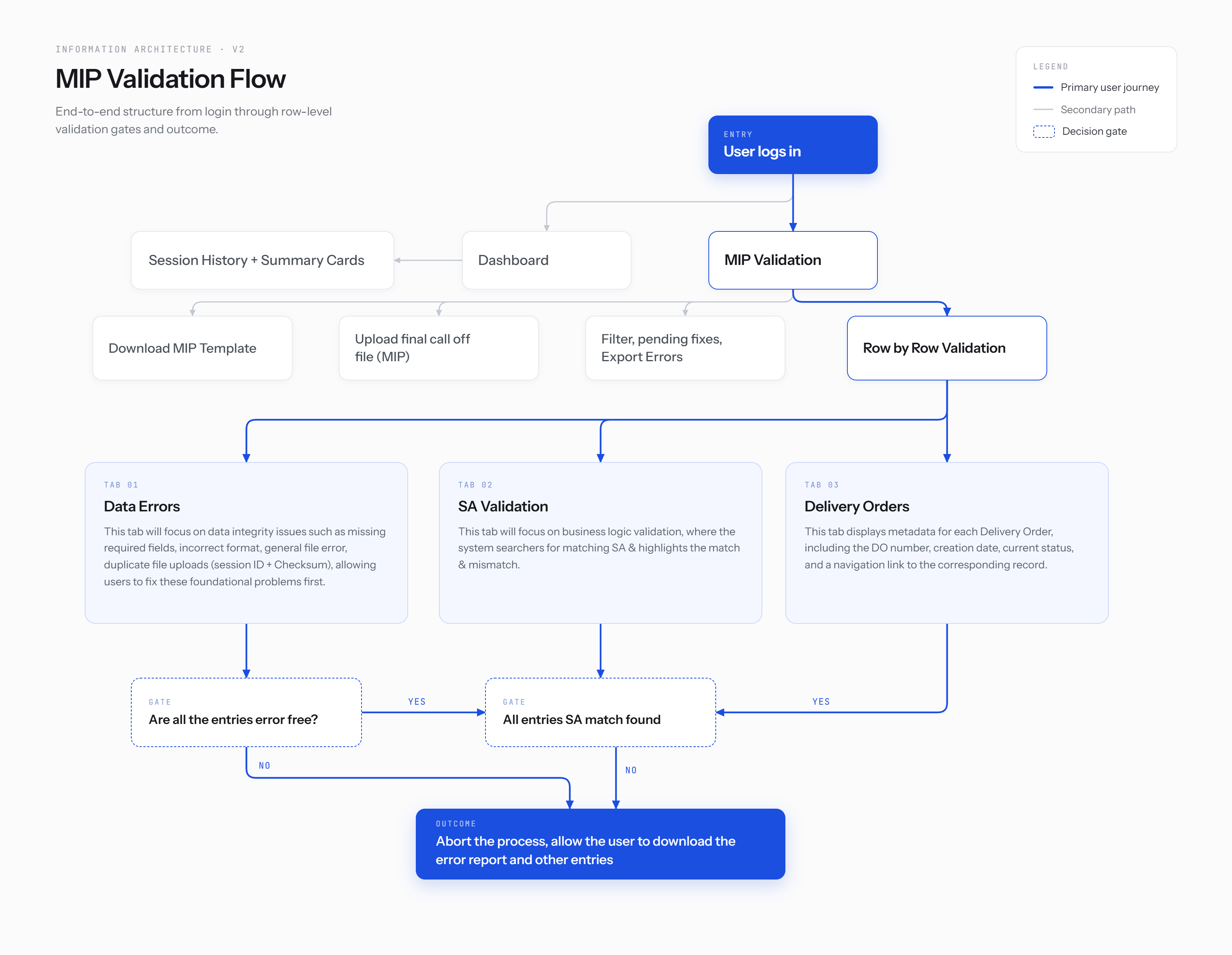
Mapped Ericsson's enterprise order architecture to identify where MIP validation fit within the end-to-end order lifecycle, including upstream dependencies, downstream automation, and system integrations.
Conducted structured discovery sessions with domain experts to uncover business rules, operational constraints, and edge cases before designing the experience.
| Discovery theme | Key insights |
|---|---|
| Users & Permissions | Identified primary user roles and access requirements. |
| Validation Rules | Validation required exact Scheduling Agreement matches with no partial processing. |
| Error Handling | Users needed inline validation, error reporting, and the ability to simulate validation before upload. |
| Audit & Compliance | Import history and audit trails were essential for traceability. |
| Bulk Operations | Workflows needed to support hundreds to thousands of line items efficiently through filtering and status visibility. |
| System Integrations | Release order creation triggered automated downstream SAP processes, defining clear workflow boundaries. |
05 — User Persona
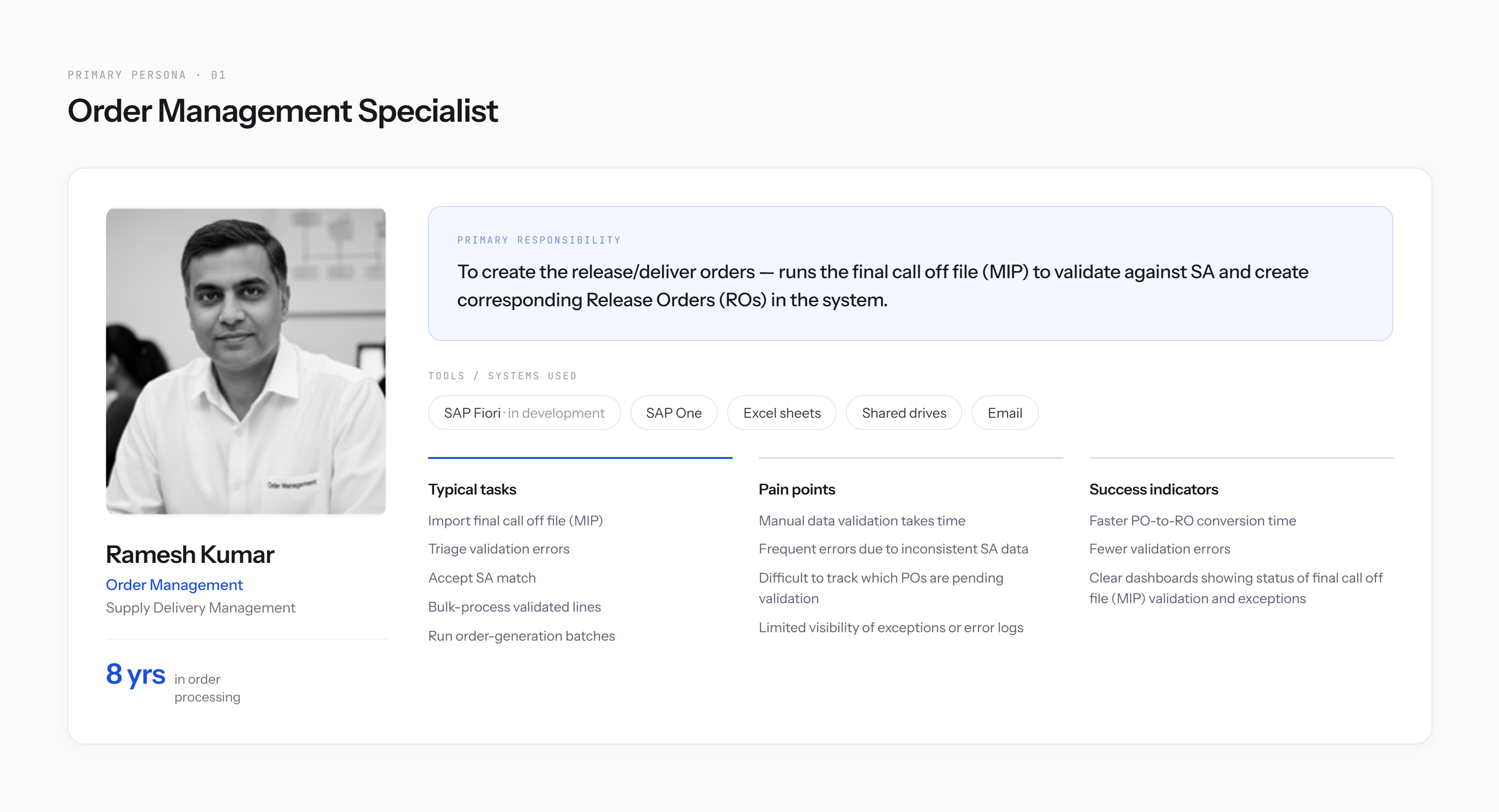
Research identified Order Management Specialists as the primary users responsible for ensuring high-volume bulk orders are validated accurately before downstream processing.
06 — Aligning Stakeholders Through Systems Thinking
Used information architecture as a collaborative tool to validate workflows, uncover dependencies, and align stakeholders before moving into interaction design.
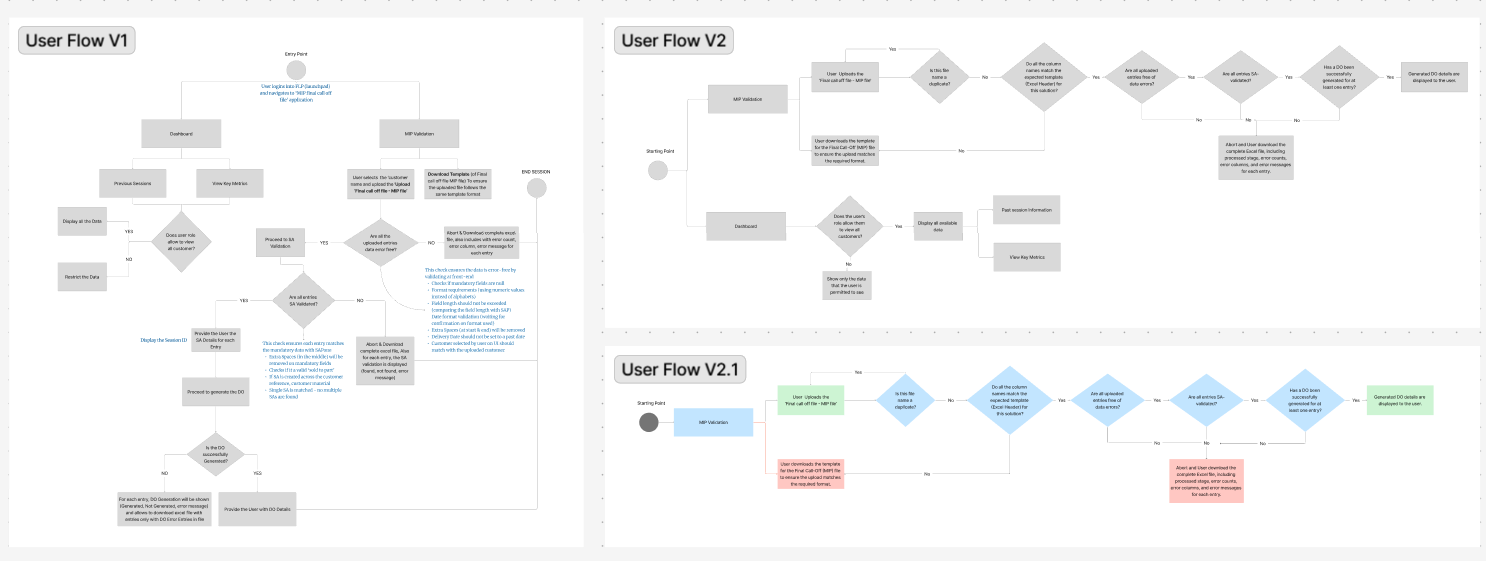
07 — User Flow
| Edge case | Before | After |
|---|---|---|
| Partial-file failure (some rows valid, some not) | Whole file rejected, no indication of which rows | Row-level status; valid rows proceed while failing rows are flagged |
| Duplicate order submission | Silently overwritten further downstream | Flagged at the validation stage with a reference to the original |
| Carrier-specific field mismatch (schema variance between accounts) | Generic "format error" | Field-level reason naming the specific mismatch |
08 — Wireframes
Before — single verdict
No confirmation until the whole file finished processing.
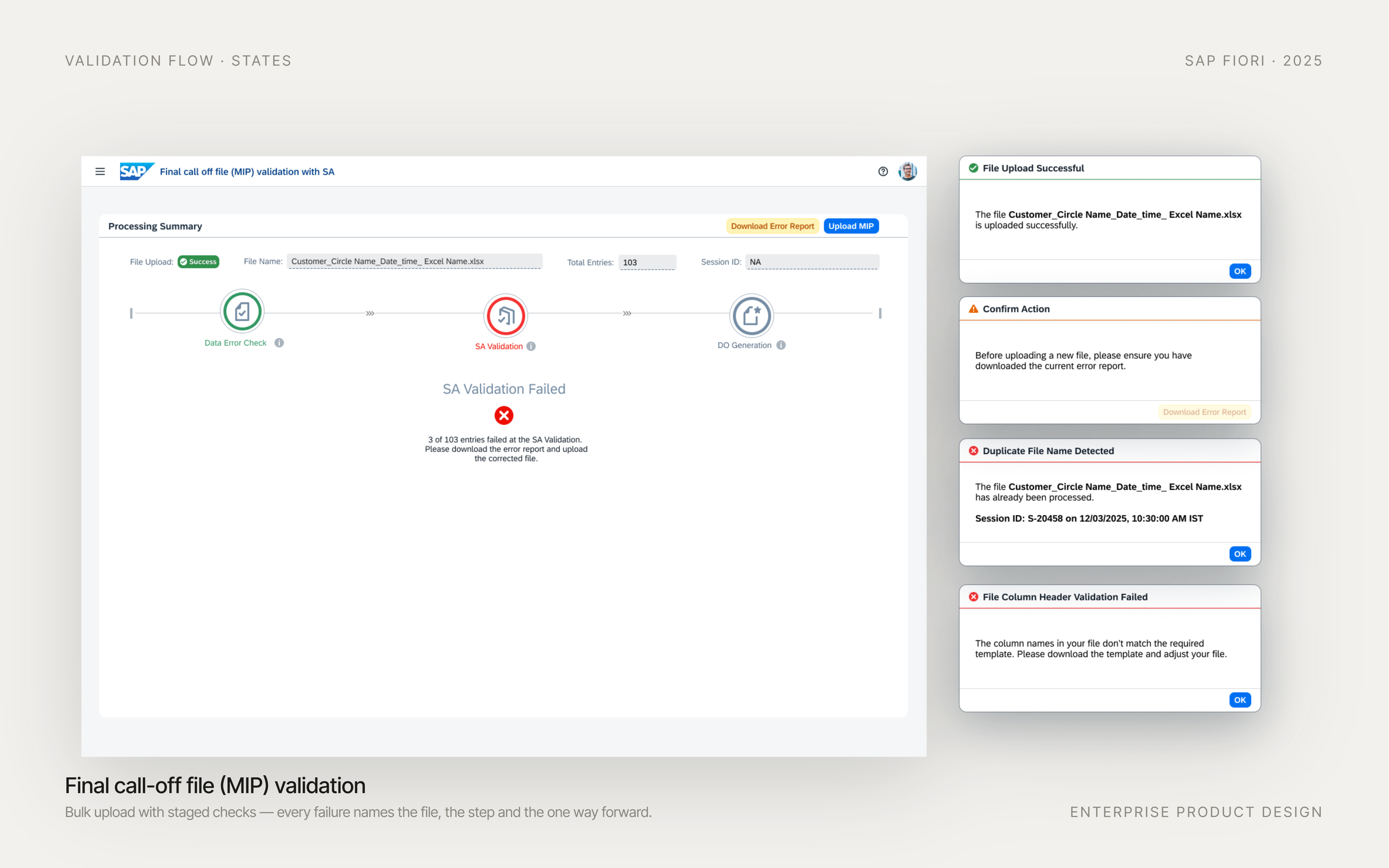
Now — per-stage status
2,140 rows queued for validation.
The bulk-upload pipeline, stepped stage by stage. Each stage now reports its own status and, on failure, its own reason — the exact thing that was previously invisible until the very end.
09 — Decisions
Decision 01
Make the pipeline legible, not just the outcome clearer
What was true
The system returned a single pass/fail after a multi-stage pipeline. Users learned something was wrong only after the fact, with no sense of where in the process it happened.
What I chose
Designed the upload flow around the stages the backend already executed internally — surfacing each one as its own state (queued, running, passed, failed-with-reason) as it happened, rather than collapsing them into a final verdict.
What I rejected
A better-written version of the same single-verdict error message. It would have softened the failure without making the process visible, and it wouldn't have surfaced anything upstream.
What it cost
Depended on the backend exposing per-stage status rather than a final result — which meant an early, unglamorous conversation with engineering about what the service could actually report, before a single screen was drawn.
Decision 02
Go looking for edge cases instead of waiting for tickets
What was true
Failures were triaged reactively through support tickets, so only the loudest ones were visible. Quieter failures — partial-file failures, duplicate submissions, silently skipped rows — had never been named.
What I chose
Sat with operations users early and walked real bulk files through the new stage-by-stage view, which surfaced several edge cases that had no prior name or handling path.
What I rejected
Treating the backend team's existing error-code list as the source of truth for what could go wrong. It was accurate for what the system could report, not for what users actually ran into.
What it cost
Added scope mid-project: the newly named edge cases each needed their own stage-level message, which meant re-negotiating the visibility model after design had already started.
Decision 03
Adopting SAP Fiori
What was true
The broader enterprise ecosystem already relied on SAP Fiori. Aligning this workflow with the existing platform ensured consistency across integrated SAP applications and simplified implementation.
What I chose
Refactored the entire experience using SAP Fiori components and interaction patterns, adapting complex validation workflows to fit within the design system while preserving usability.
What I rejected
Rather than recreating custom components, I leveraged Fiori's existing patterns, extending them only where necessary to support enterprise validation workflows and multi-stage status visibility.
What it cost
Designing within an established system meant balancing user needs with predefined component behaviors, interaction patterns, and platform constraints while delivering an implementation-ready solution.
10 — Reflection
The biggest takeaway was that transparency is often more valuable than automation. Users didn't just need a faster workflow, they needed visibility into every validation stage, confidence in the system's decisions, and clear paths for resolving exceptions. By aligning users, SMEs, and engineering around a shared understanding of the workflow, design became a tool for reducing ambiguity rather than just improving usability.